Does simulator-based flight training result in real-world flying skills, or is it just promotional exaggeration?
Flight simulators are highly effective in supporting pilot training. They provide a safe, controlled, and cost-effective environment for students to practice various aspects of flying, from basic maneuvers to complex emergency procedures, according to Global Training Aviation. Simulators allow pilots to learn in a risk-free setting and develop skills that can be transferred to real-world flying, says Florida Flyers Flight Academy.
• Private Pilot Familiarization
• Instrument Flying Familiarization
• MST Reference Documents
> Learn to Fly using Flight Sim
• How to become an airline pilot
Rev: 520251
Can quality simulator-based training really improve real-world flying skills—or is it just marketing hype?
With powerful tools like Microsoft Flight Simulator (MSFS) and X-Plane now widely accessible, it’s a valid question for both student and experienced pilots alike.
The short answer: Yes—when used correctly and with purpose, home flight simulation can play a significant role in flight training.
To be transparent, our MST programs are built around providing instruction through simulators, so we’re strong advocates of their value. But we also acknowledge the concerns—particularly the risk of negative transfer and the wide range of opinions among instructors and students.
What’s often overlooked, however, is the substantial body of research—some of it decades old—that explores this very issue. In the following discussion, we’ll break down the data, explore the benefits, and honestly assess the limitations, so you can make informed decisions about how to use simulation effectively while minimizing potential downsides.
What Flight Simulators Can (and Cannot) do:
Teach your basics - Yes
Simulate procedures - Yes
Help you learn to land - Yes
Teach you radio Procedures - Yes
Teach you aircraft systems - Yes
Teach you instrument flying - Yes
Provide the same real aircraft feel - No
Count towards your flight training time - No
Modern flight simulators—especially when combined with quality hardware—deliver impressive levels of realism.
According to a 2023 survey by the Flight Simulation Association (FSA) involving over 1,000 pilots, student pilots who used home simulators required, on average, 5.5 fewer flight hours in the actual aircraft to earn their private pilot certificate.
This points to a strong case for positive transfer of learning—where skills practiced in a simulated environment translate effectively to real-world flying.
But which skills benefit the most from this kind of virtual training? Let’s take a closer look.
Flight simulators are an unmatched tool for mastering cockpit procedures and flows.
From engine start-ups and avionics configuration to preflight checklists and step-by-step cross-country planning, simulators help pilots build procedural fluency efficiently and affordably.
Consider the ability to fly a traffic pattern ten times in a row, adjusting for different wind conditions, analyzing each leg, and refining your technique—all without burning fuel or logging hobbs time.
Need to practice emergency procedures? Simulators provide a safe environment to rehearse engine failures, instrument issues, or even less common scenarios found in the POH, like ditching.
Even procedural reviews in a sim translate to real-world gains. One FAA study showed that pilots who rehearsed instrument tasks using a PCATD required about 20% fewer repetitions to complete VOR approaches in the actual aircraft—demonstrating tangible savings in both time and money.
And with more advanced sim setups—like touchscreen panels or hardware that mirrors your cockpit—you can reinforce muscle memory. That kind of tactile repetition helps turn procedures into instinct, especially when cockpit workload increases.
Getting ready for your first solo cross-country?
Using a flight simulator to “pre-fly” the route can greatly enhance your confidence. It’s a great way to practice visual landmark recognition, dead reckoning, and VOR navigation—especially with the high-quality visuals in simulators like Microsoft Flight Simulator.
Simulators are also an essential tool for instrument training.
You can sharpen IFR skills by practicing ILS approaches, holding patterns, DME arcs, and unusual attitude recovery in a variety of simulated weather scenarios.
Aviate, Navigate, Communicate.
For many new pilots, communicating with Air Traffic Control (ATC) can be a major source of anxiety—often called “mic fright.” Online networks like PilotEdge (with its structured training program) and VATSIM (a free, worldwide network) offer real-time interaction with live controllers. These platforms provide a low-pressure environment to practice radio communication right from your desk.
Here, mistakes come without real-world consequences, giving you the freedom to learn proper phraseology, get feedback, and build your confidence safely.
Flight simulators provide more than just procedural training—they create a valuable space to sharpen essential cognitive skills like visual scanning and grasping how aircraft controls respond.
5.1 Developing the Visual Scan Habit in the cockpit: building an effective scan pattern—consistently shifting focus between outside references, instruments, and potential traffic—can be daunting, particularly for new pilots.
This isn't just an instrument flight skill. Even under VFR, a disciplined visual scan is vital for staying ahead of the aircraft, detecting other traffic, and managing airspeed and glidepath.
Flight simulators allow you to isolate and practice these scanning patterns repeatedly, without the full workload of real flight, so you’re better prepared to use them confidently in the air.
5.2 Building Mental Models: Grasping how control inputs affect aircraft performance is essential—and simulators are especially effective at clarifying these cause-and-effect dynamics.
They allow you to intentionally adjust pitch and power, then immediately see how those changes influence airspeed and attitude. For instance, you can refine your technique for holding a target approach speed by controlling pitch, while using power to manage your glide path.
Tools like pause and replay make it easy to break down these interactions, review mistakes, and reinforce key concepts—such as “pitch controls airspeed, power controls altitude”—all without the pressures and distractions of actual flight.
This focused, low-stress practice builds a strong mental model of aircraft control, setting the stage for smoother transitions to real-world flying.
5.3 Repetition Builds Retention: One of the greatest advantages of flight simulators is the ability to repeat maneuvers, approaches, or short flight segments as many times as needed—without consuming fuel, logging Hobbs time, or adding stress in the real cockpit.
This kind of low-pressure repetition helps cement both visual scanning habits and a solid understanding of how aircraft respond to control inputs. You can experiment freely, make mistakes, pause to reflect, and immediately try again—a learning process that’s difficult (and expensive) to replicate in the actual aircraft.
Research supports this approach. In a study by Rogers et al., pilots trained on Microsoft Flight Simulator (MFS) just one hour per week over ten weeks learned key upset recovery responses—like applying full throttle in nose-high situations or reducing power in nose-low dives—just as effectively as those trained on a high-fidelity GL2000 motion simulator. The key difference? Repetition. The study emphasized that repeated practice was central to learning and retaining these critical responses.
- Repetition is a powerful learning reinforcement for such responses. – Rogers et al.
The takeaway: consistent, focused repetition in a sim environment is a powerful way to build confidence, reinforce skills, and improve retention. Done with intent, home simulation becomes more than just a practice tool—it’s a foundation for real-world proficiency.
Using a simulator to develop core visual habits and cognitive skills means you show up to real-world flight lessons better equipped. This lets you and your instructor spend more time refining control feel, handling real-world variables, and applying your skills in a dynamic flying environment.
Modern avionics suites like the Garmin G1000 can feel overwhelming at first. Rather than using costly Hobbs time to learn on the fly, take advantage of a simulator to get comfortable with flight plan entry, autopilot functions, and system navigation—all at your own pace.
Here's a more detailed look at why familiarity with avionics is important:
Pilots:
Pilots need to be able to understand and utilize the information provided by avionics systems to make informed decisions during flight. This includes navigating using GPS, communicating with air traffic control, and monitoring engine performance. Familiarity with the specific systems and their functions is essential for safe and efficient flight operations.
Mechanics:
Avionics technicians need to be able to diagnose and repair issues with the electronic systems in aircraft. This requires a strong understanding of electrical schematics, avionics test equipment, and relevant software tools. They also need to be able to install and maintain new avionics equipment, as well as troubleshoot problems that may arise, says the Bureau of Labor Statistics (.gov).
General aviation:
Even for general aviation pilots, familiarity with advanced avionics systems like "glass cockpits" is becoming increasingly important as these systems become more common in various aircraft types.
Troubleshooting:
Knowing how avionics systems work allows for quicker and more accurate troubleshooting of potential problems. For example, understanding how databus errors can indicate communication problems between different systems can help a mechanic diagnose and resolve an issue faster, notes Aviation Consumer.
Situational Awareness:
Avionics systems provide pilots with essential information about their surroundings, including weather, navigation, and altitude. Familiarity with these systems allows pilots to maintain a clear understanding of their situation and make informed decisions, notes First Flight Aviation.
Scenario-based training is a key element of professional aviation instruction—and simulators are ideally suited for it. They let you safely experience the outcomes of flying into marginal weather, mishandling fuel planning, or rerouting around simulated storms, all without real-world risk.
This kind of immersive, hands-on exposure strengthens judgment and decision-making skills, reflecting methods long used in airline and military training programs.
Flight simulators are powerful tools, but they come with important limitations and potential drawbacks. Recognizing these is essential to using them effectively and responsibly.
8.1 Lack of Physical Sensation (Feel)
Fixed-base simulators, while valuable, fall short in replicating the physical sensations of actual flight—such as G-forces, control feedback, the subtle airframe buffet before a stall, or the tactile feel of the aircraft settling during the flare. As a result, fully mastering landings in a simulator is highly unlikely. Crucial elements like judging height, sink rate, and timing the flare depend heavily on real-world depth perception and kinesthetic feedback, which most home setups simply can't provide.
Simulators also miss the physical and psychological stress of turbulent or gusty conditions. In real flight, being jolted by mechanical turbulence near the ground or experiencing wind shear on short final brings a level of intensity that's hard to simulate—your muscles tense, your reflexes sharpen, and your mental workload spikes. That kind of visceral response just doesn’t happen when you’re sitting comfortably at a desk.
Even with a motion platform, the stakes are never quite the same. Your life isn't on the line, adrenaline doesn’t surge in the same way, and the emotional weight of real risk is absent. That difference profoundly affects how you experience pressure—and ultimately, how you learn to handle it.
8.2 The Risk of Negative Transfer (Bad Habits)
One of the most significant risks in simulator training is negative transfer—picking up habits or techniques that don’t translate well to real-world flying and may even hinder progress. Some common pitfalls include:
Instrument Fixation: Focusing too much on instruments at the expense of maintaining a proper outside scan, which is critical for VFR flight and traffic awareness.
Rudder Neglect: Skipping coordinated rudder use—especially if training without pedals—which can lead to poor control technique and uncoordinated flight.
Improper Trim Technique: Holding constant pressure on the controls instead of trimming for stable, hands-off flight.
Ineffective Scan Patterns: Even when practicing visual or instrument scans, the lack of real-world stimuli and consequences can lead to habits that are incomplete or inefficient.
Being aware of these risks is key to ensuring your sim time reinforces good habits rather than creating new problems.
8.3 More on Scan Patterns and Fixation Pitfalls
In the absence of real-world consequences or sensory feedback, students often fall into counterproductive habits—like spending too much time looking inside the cockpit, focusing on instruments rather than maintaining a proper external visual scan.
Even during instrument scanning, there’s a common tendency toward instrument fixation—lingering on a single gauge (such as the airspeed or attitude indicator) instead of making smooth, deliberate transitions between critical references.
Both habits can erode situational awareness and are frequently seen in early-stage students. Alessandro (2006) noted that self-guided use of desktop simulators often led to an over-reliance on instruments, requiring later correction to instill appropriate VFR scanning techniques.
However, research by Dubois et al. (2015) found similar tendencies in students with no prior simulator use, indicating that these behaviors may be part of the natural learning process—not unique to simulation training.
With the right instruction, simulators can effectively support the development of proper scan habits. But without structured guidance, poor patterns can become ingrained, making them more difficult to correct once in the real cockpit.
8.4 Performance Inaccuracy
Important Note: Home Simulators Are Not Reliable Sources for Aircraft Performance Data
Even though today’s flight models can be highly advanced, they are still just approximations. Performance metrics like climb rate, cruise speed, fuel consumption, and takeoff or landing distances in a simulator often differ—sometimes significantly—from the values provided in the official Pilot Operating Handbook (POH) or Aircraft Flight Manual (AFM).
Never use simulator-derived data for real-world flight planning. Your sim cannot accurately predict whether you’ll clear terrain on departure, reach your destination with adequate fuel, or meet takeoff and landing requirements.
Always consult the official POH or AFM for all performance calculations, and apply appropriate safety margins. No exceptions.
The real value of simulators comes from structured use—ideally with guidance from an instructor, whether in person or through a remote sim CFI.
An experienced instructor can help you focus on the right training objectives, such as procedures, radio communications, navigation, and systems management, while also spotting and correcting bad habits before they take root. This approach promotes positive transfer of skills to real-world flying, rather than unintentionally reinforcing mistakes.
When used this way, a simulator becomes a powerful complement to flight training—not a replacement for real-world experience.
Some flight instructors may be cautious or even skeptical about simulator use—and often, that skepticism is based on valid, firsthand experience.
10.1 Negative Transfer and Lack of Feel
CFIs have encountered students who arrive with ingrained bad habits from unsupervised simulator use—most commonly excessive instrument fixation and inadequate visual scanning. This concern is backed by research: studies like Lubner et al. (2017) and Alessandro (2006) highlight that students using PCATDs independently often develop flawed scanning techniques, particularly an over-reliance on instruments.
Instructors also rightly emphasize that simulators can’t replicate the tactile feedback of real flying—especially for kinesthetic skills like the flare, crosswind landings, or coordinated rudder input.
Research such as Reweti et al. (2017) further supports this caution, showing that if not properly guided, simulator use for developing basic psychomotor skills can actually hinder progress.
That said, it's also important to recognize that many of these issues are common among beginners, regardless of simulator exposure. For example, Marques et al. (2022) found that early-stage students with no prior sim experience also tended to look inside the cockpit too much during initial flights.
In some cases, skepticism toward simulators reflects perception more than an objective assessment of their actual impact.
- It seems that simulators might be blamed for creating bad habits as a way of portraying resistance to changes that the technology could bring into flight training. – Marques et al., 2022
10.2 Experiences With Older Technology
Some of the skepticism from instructors stems from their experience with older simulators that lacked the realism, usability, and graphics found in today’s platforms like MSFS or X-Plane, when paired with modern hardware.
Evaluating simulators based on 1990s software standards is an unfair comparison—today’s systems have made significant advancements in realism, ease of use, and their educational value.
10.3 Economic Incentives
Some resistance to simulators may stem from concerns that students might reduce their billable flight or certified simulator time by relying on them. While not universal, this dynamic exists in some flight schools and should be acknowledged.
Instructors, particularly those focused on building flight hours quickly to transition to airline careers, might be less inclined to encourage simulator use.
Time spent supervising self-guided simulator practice doesn’t count as PIC time, doesn't contribute to ATP minimums, and often doesn’t pay as well as time spent in an actual aircraft.
While most instructors are genuinely committed to their students’ success, the economic realities don’t always align with promoting lower-cost, at-home training options or simulators available at the flight school.
10.4 The CFI "Feedback Loop"
In some flight schools, instructors may unintentionally reinforce a narrow perspective on training tools and methods, creating what could be called a “Feedback Loop.” This occurs when a flight instructor's personal experiences or biases influence how they view training tools like simulators, which can then be passed along to students. If an instructor has limited exposure to modern simulators or is used to traditional training methods, they may be less inclined to embrace newer technologies, reinforcing the idea that these tools aren’t as effective or necessary.
This cycle can lead to a lack of open discussion about the benefits of simulators, as instructors might unintentionally echo their own reservations to students. Without exposure to a broader range of tools and training techniques, the value of simulators in the learning process can be underestimated, limiting students' opportunities to take advantage of supplementary resources that could enhance their skills.
Skepticism can also be handed down across generations. As Marques et al. (2022) pointed out, instructors frequently highlight the limitations of simulators, particularly concerning "bad habits," without providing specific evidence. This often results in resistance to incorporating newer tools, like desktop simulators, into established training programs.
- You'll just pick up bad habits.
- The simulator will cause problems in real.
- It's only useful for IFR flying, not VFR.
- You can practice procedures, but that's all.
One of the most frequently asked questions from both students and instructors is: How realistic does a sim setup need to be to make a difference?
The answer largely depends on your training goals—and research shows that even budget-friendly desktop simulators can be highly effective for specific types of learning.
11.1 High Fidelity Isn’t Needed for Cognitive Skill Development
A 2017 study by Reweti et al. compared a low-cost PC-based aviation training device (PCATD) with a certified flight training device (FTD) and found no significant difference in VFR performance improvements between the two. Both simulator groups significantly outperformed students who had no simulator exposure, demonstrating that effective procedural and cognitive learning doesn’t require high-end equipment.
Likewise, a 2002 meta-analysis by Noble, reviewing decades of fidelity research, concluded that greater simulator realism doesn't automatically lead to better learning outcomes—particularly for beginner pilots. In the early stages of training, building mental models, mastering checklist flows, and improving decision-making skills are far more valuable than the tactile realism of a yoke or panel.
11.2 Consistent Practice Matters More Than High-End Equipment
Several studies (Marques et al., 2022; Ortiz, 1993; Rogers et al., 2009) highlight the benefits of repetition and lowering cognitive load. Even practicing in a basic simulator before a real flight lesson can help students feel more confident, less overwhelmed, and better able to process in-flight instruction.
Students feel less overwhelmed when they are in the aircraft – Marques et al. (2022)
You don’t need a motion platform or an immersive 220-degree display to develop situational awareness, procedural skills, or radio proficiency. Even a basic setup—like MSFS or X-Plane on a laptop with a simple joystick and keyboard shortcuts—can effectively build confidence, particularly when used with a structured training plan.
11.3 When Realism Counts: Tasks That Benefit from Higher Fidelity
For dynamic tasks such as landings, flare control, or handling turbulence and gusty winds, simulators often fall short—especially without motion feedback or high-quality flight controls.
Using unrealistic or incomplete hardware setups—like flying without rudder pedals or relying on a game controller—can also promote poor habits, such as uncoordinated flight or improper control inputs.
This issue was notably raised in the NTSB’s investigation of American Airlines Flight 587, where improper rudder technique—partially linked to simulator training—and differences in simulator pedal feel were identified as contributing factors.
That said, context matters.
In general aviation, most pilots regularly practice rudder control and handle challenging flight conditions in the actual aircraft. These skills are built and reinforced during real-world flying. In contrast, airline pilots often encounter high-risk scenarios only during simulator training, making simulator fidelity far more critical in that environment.
For GA pilots, the simulator is a valuable supplement—not a substitute—for in-aircraft experience. While fidelity does matter, its limitations are typically offset by hands-on flight training in the real world.
11.4 Align the Tool to the Task
What’s most important is aligning your simulator’s level of realism with the specific skill or objective you’re trying to train.
11.5 Instructor Guidance Trumps Equipment Realism
The research is clear: the instructor plays a more crucial role than the simulator itself. Studies such as Valverde (1973) and Lee (2009) demonstrate that an experienced instructor can guide students through the simulator’s limitations, focus on the appropriate training tasks, and prevent the development of bad habits.
- The instructor influenced the student’s progress more than syllabi variations or the simulator itself. – Valverde, 1973
- The instructor must communicate the differences between simulator and aircraft performance so pilots aren’t surprised when flying the real thing. – Lee, 2009
A CFI who recognizes the limitations of the simulator and helps you connect sim training with real-world flying can prevent negative transfer, making even a basic setup much more effective.
Guided practice with an instructor is what truly makes the difference.
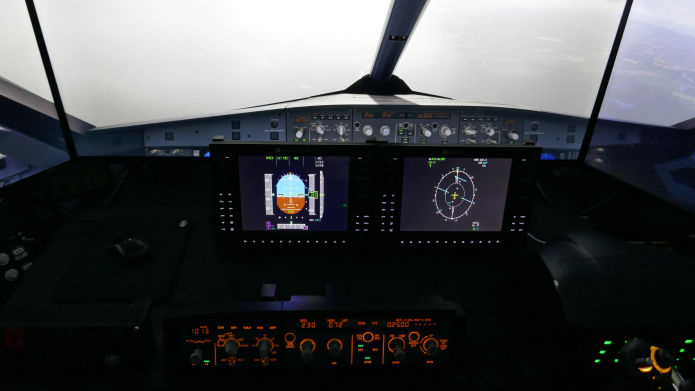
Can a flight simulator replace actual flying and in-person instruction? No.
Can it speed up your learning, make you a safer, more skilled, and better-prepared pilot, and help you save both time and money? Absolutely.
Use it strategically to refine procedures, checklists, communications, navigation, and avionics systems. Utilize it to ease anxiety and enhance your readiness for real-world lessons. When used with proper guidance, it serves as a valuable supplement to traditional flight training.
To help you build and maintain your proficiency through MST, this guide will explain you how MST FSTD (Flight Simulation Training Device) keep your training focused, and your training scenarios are realistic in the MST flight simulator.
CONTENTS:
ID Title
1 Qualification Test Guide (QTG) Introduction
1.1 SECTION 1 - FNTP - I Flight Simulator Training Device
1.2 Certification of MST NFPT - I and BITD rated FSTD
1.3 Evaluation Policy
1.4 Recurrent Evaluations
1.5 Changes to the FSTD
1.6 Special Evaluations
2.1 SECTION 2 - Qualification Test Guide
2.1.1 FSTD Identification
3.1 SECTION 3 - Glossary of Terms
3.2 Daily Functional Preflight Work Instructions
3.3 Table of FSTD Validation Tests
3.4 Table of Functions and Subjective Tests
3.5 Transport delay and Latency Testing
3.6 Flight Procedures Training Device
3.6.1 Table M-1. FPTD requirements
3.7 Table M-2. List of training and checking tasks for the MST FPTD
3.8 Table M-3. Instructor operating station functions
3.9 Appendix A – Feature Fidelity Levels
4.1 SECTION 4 - Validation Tests
4.1.1 Normal Climb
4.1.2 Stall Warning
4.1.3 Engine Acceleration
4.1.4 Engine Deceleration
4.1.5 Column Position Versus Force
4.1.6 Control Wheel Position Versus Force
4.1.7 Rudder Pedal Position Versus Force
4.1.8 Longitudinal Power Change Force
4.1.9 Longitudinal Flap Change Force
4.1.10 Flap Operating Times
4.1.11 Longitudinal Trim
4.1.12 Longitudinal Static Stability
4.1.13 Longitudinal Dynamic Stability (Phugoid Dynamics)
4.1.14 Roll Response Rate
4.1.15 Spiral Stability
4.1.16 Rudder Response
4.1.17 Steady State Sideslip Or Constant Heading
4.1.18 Transport Delay
5.1 SECTION 5 - MST Avionics Evaluation
A1 ANNEX - 1 Recurrent Re-Qualification Results
A2 ANNEX - 2 Non-Complex Organisations - General
A3 ANNEX - 3 Safety Management system
A4 ANNEX - 4 Statement of Compliance